Turning a feature request into a five-document pipeline an agent can pick back up
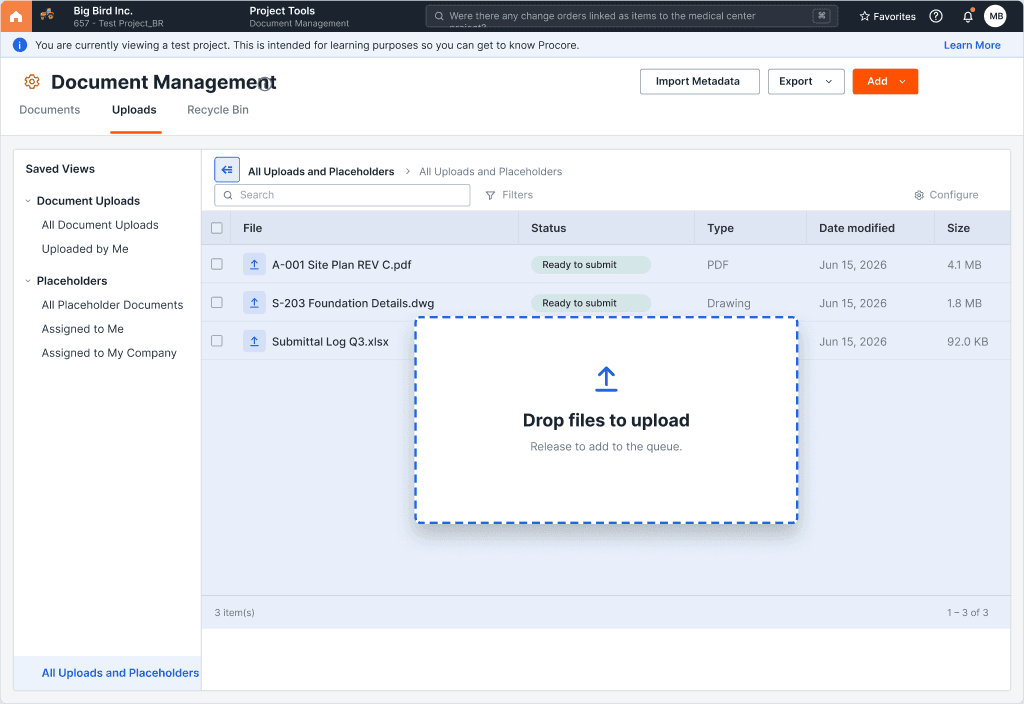
Procore Document Management — Drag-and-drop file uploads
- The problem
- PDM had zero drag-and-drop pattern anywhere, and the V1 implementation shipped before a design artifact existed to review it against
- My role
- Design lead — built the AI-assisted planning pipeline and the resulting design brief
- Status
- V1 live behind a staged rollout; V2 surfaces specified, not yet built
- Tools used
- Chained AI planning skills, writing to a resumable checkpoint file at every step
Background
Overview
Procore Document Management is the tool document controllers live in all day, and it had never shipped a native drag-and-drop upload pattern — every file went through a picker dialog, one click at a time. Competitors had closed that gap years earlier, and it showed up in feedback from customers migrating to Procore.
The engineering team's V1 implementation landed in code before there was ever a Figma file for it — a reasonable call given the pattern was well understood, but it left a real gap: no design artifact to review the shipped behavior against, and no clear plan for the two follow-on surfaces already scoped for V2. I used this as the proving ground for a different way of working: a chain of AI-assisted planning documents, each one a genuine deliverable, each one resumable if the thread got picked up days later by someone else — or by me, after a context switch.
The pipeline
Five documents, one thread
Product brief
Problem, opportunity, personas, and success metrics — the strategic frame everything downstream builds on.
Feature briefs
One brief per job-to-be-done, split by rollout surface, so each piece of scope maps to a distinct release and a distinct review.
Design brief
Translates the briefs into UX-actionable form — maps every requirement to a real design-system component, locks down state behavior and edge cases before a single screen gets built.
Engineering handoff
Rollout plan, telemetry contract, and the trickier implementation details — the parts an engineer needs written down that a designer wouldn't normally think to specify.
Pipeline state
A living checkpoint file recording what phase the work is in, what's been decided and why, and what's still open — so picking the thread back up doesn't mean starting over.
What made it resumable
The checkpoint pattern
- 01
Decisions recorded with rationale, not just outcomes
Every choice notes why the alternative was rejected — so revisiting a decision later doesn't mean re-litigating it from scratch.
- 02
Open gaps tracked as first-class items
Unresolved questions — a missing baseline metric, an unconfirmed count, an unassigned owner — are logged next to the decisions instead of staying implicit in someone's memory.
- 03
A single next step, always named
The checkpoint file always states the next suggested phase, so resuming the work doesn't require re-reading the entire history first.
What this replaced
The same feature, planned two ways
Before, the shipped V1 had no design brief behind it. After, the full feature — shipped and planned — has one continuous, resumable thread.
Before
- ✗A shipped feature with no design artifact to review it against
- ✗Requirements scattered across a source document and tribal knowledge
- ✗Every planning restart meant re-reading the whole thread from the top
After
- ✓A five-document pipeline mapping problem → briefs → design spec → engineering plan
- ✓Every requirement traced to a real component, a state, and an edge case
- ✓A checkpoint file that picks up exactly where the last session left off
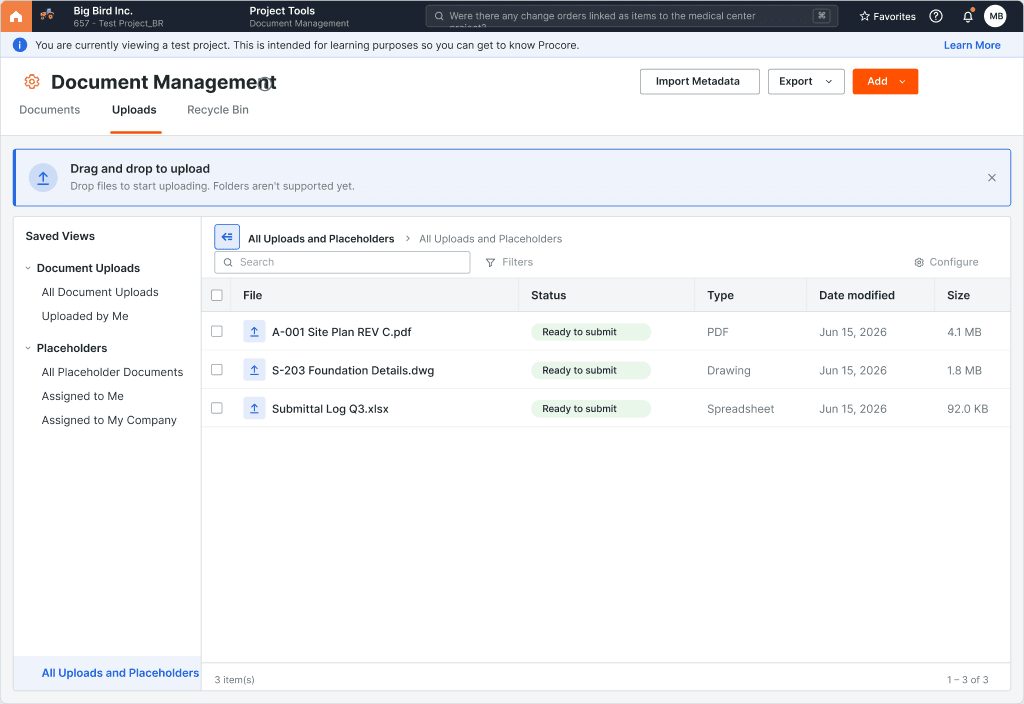
What shipped
V1 — the page-level drop overlay, an empty-state drop zone, and the first-visit coachmark — is live behind a staged rollout. The two V2 surfaces (contextual revision drops and placeholder fulfillment) are fully specified in the same pipeline, reusing the V1 primitives, and ready to move into build whenever they're prioritized.